Chrome extension
Verdict beside everything you read
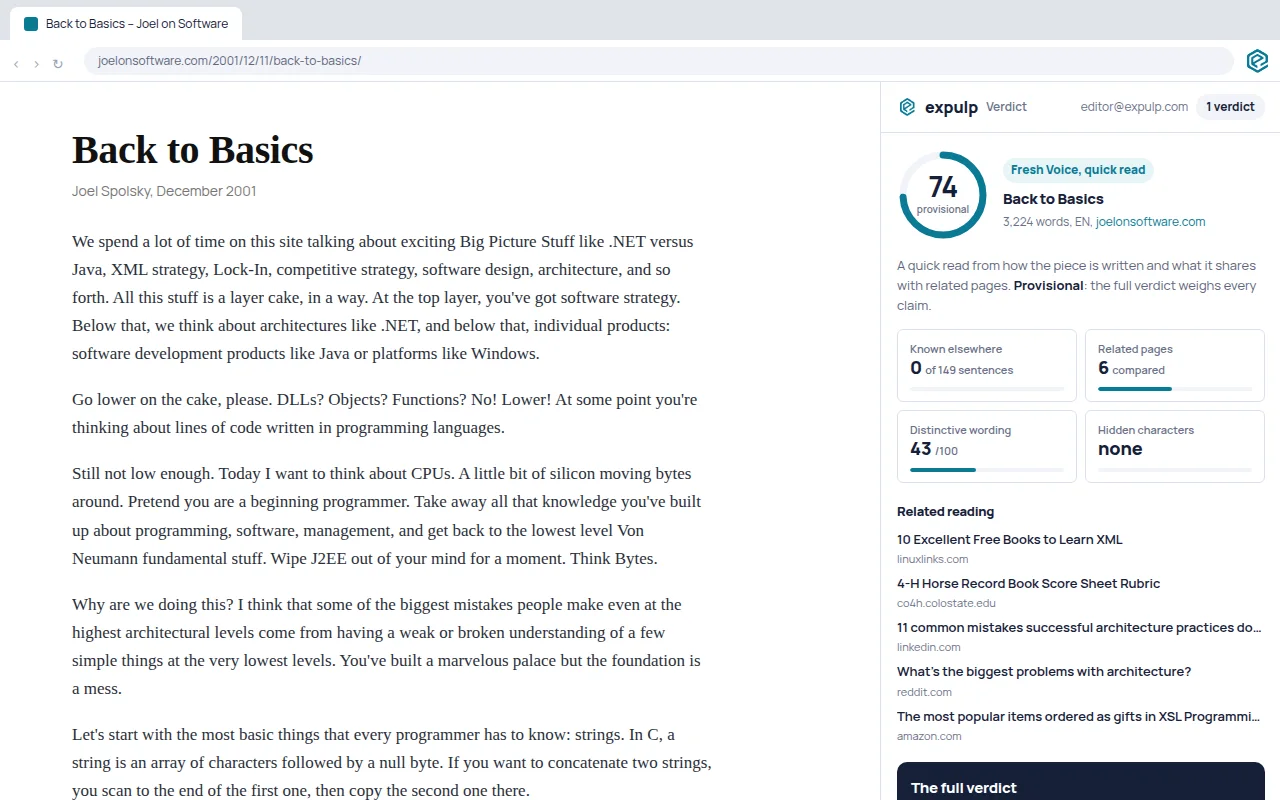
One click on any article: a free quick read in the side panel, and the full verdict when you want every claim weighed. The page stays where it is. Nothing opens in a new tab.
The Chrome Web Store listing is in review. Until it is live: unzip the download, open chrome://extensions, switch on Developer mode and choose "Load unpacked". Works in Chrome, Edge and Brave.
How it works
- Open an article, anywhere on the web, and click the Verdict mark in the toolbar. Or right-click a page, a link or selected text.
- The quick read arrives in about twenty seconds: a provisional score, how much of the piece is already said elsewhere, the pages it shares ground with, hidden-character checks. No model is involved; it is free.
- Get the full verdict when it matters: every claim marked as the author's own, something any AI would say, known elsewhere or common knowledge, with its credibility and the effort the piece shows. One to two minutes, one credit.
What is free
Five quick reads without an account. Ten more with a free account, and unlimited quick reads once you have bought any credits. A full verdict costs one credit: $1 each, 10 for $5, or part of a monthly plan. A piece that was analysed before costs nothing.
Signed in once, everywhere
Sign in on verdict.expulp.com and the extension is signed in too: your credits, your history and your results are the same in the panel, on the site and through the API.
Pages it cannot read
Browser pages, PDFs and local files. If a page is behind a paywall or a login, the panel reads the text your browser already shows instead of fetching the page again. Pieces must be 120 to 6,000 words.
Privacy, in short
The extension sends the address of the page you ask it to read, or the text you selected, to verdict.expulp.com, and nothing else. No browsing history, no analytics, no third-party trackers. The full privacy notice.
The Chrome Web Store listing is in review. Until it is live: unzip the download, open chrome://extensions, switch on Developer mode and choose "Load unpacked". Works in Chrome, Edge and Brave.